The Rise of Conversational Queries: What It Means for SEO


Search is shifting again.
And this time, it’s bigger than just another algorithm update.
For Microsoft Dynamics Partners and ISVs, the way buyers look for information is changing right under our feet.
They’re no longer typing keyword fragments into Google.
They’re asking full, natural-language questions in AI tools like Copilot, ChatGPT, Gemini, and Perplexity, expecting clear, direct answers.
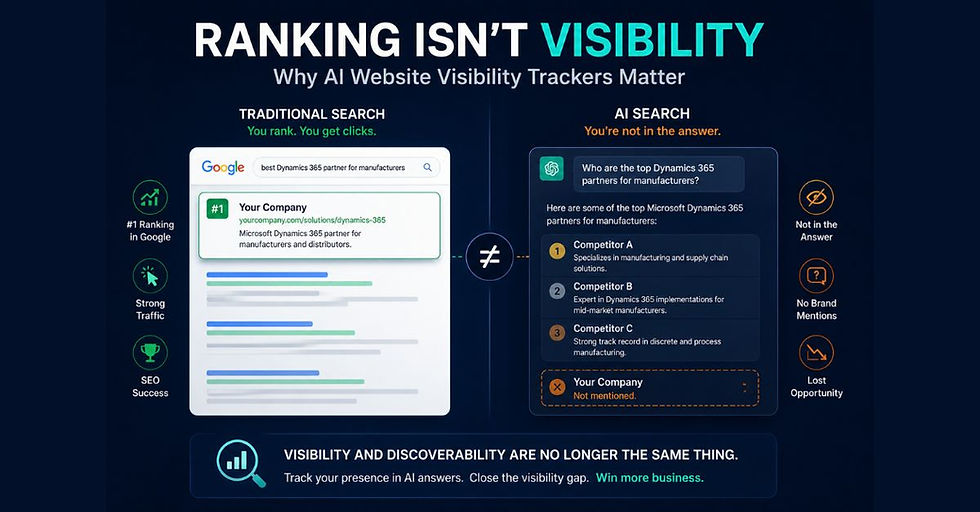
And here’s the part that should make every Partner lean in: AI tools aren’t returning links.
They’re returning answers.
If your content isn’t showing up in those answers, you’re invisible, no matter how well you ranked before.
This shift to conversational search is one of the biggest disruptions we’ve seen in SEO since Google emerged two decades ago.
If you want to understand the bigger picture behind this shift, read our guide on AI Search vs Traditional Search for Microsoft Dynamics Partners
And it’s reshaping how Dynamics buyers discover solutions, compare ISVs, and build their shortlist.
So, let’s break down what conversational queries actually mean, why they matter for your SEO strategy, and how Partners can stay visible in a world where AI, not Google (apart from Google AI), is shaping the buying journey.
Table of Contents
Introduction: Search Has Changed Again
If you’ve been relying on traditional SEO tactics, keywords, backlinks, and page-one rankings, it’s time to rethink your playbook.
Because buyers aren’t searching the way they used to.
They’re not typing:
“Dynamics 365 job costing module”
“Business Central ISV manufacturing add-on”
“Best CRM for SMB Dynamics”
Instead, they’re asking AI tools:
“How can I track job costing and profitability in Dynamics 365 Business Central?”
“Which ISVs help manufacturers reduce production costs in Dynamics?”
“What’s the best CRM for a small distributor using Dynamics 365?”
And the answers coming back aren’t lists, they’re decisions.
AI interprets the question, determines intent, evaluates context, and chooses the answer.
That’s the difference between ranking on Google and being selected by AI.
For Partners and ISVs, that’s the new battleground.
Why Conversational Queries Are Taking Over
We’ve been preparing for this moment for a decade.
Voice assistants like Siri and Alexa trained people to ask questions in plain language.
No one says: “Weather Tampa 7-day forecast.”
They say: “What’s the weather going to look like in Tampa this week?”
Now that same behavior has moved into business research.
And it’s hitting the Dynamics ecosystem even harder because our buyers face complex decisions, job costing, inventory optimization, production scheduling, reporting automation, forecasting, and resource planning.
These aren’t keyword searches.
They’re full questions that require full answers.
What’s driving the shift?
AI Tools Are Becoming the First Stop - Buyers don’t want 20 links; they want one clear recommendation. And AI tools provide that.
Natural Language Feels Easier- Typing fragments feels outdated. Talking to AI feels like talking to a consultant.
Buyers Expect Context, Not Keywords - They want answers framed specifically for:
Their role (CFO, COO, Ops Manager)
Their industry (manufacturing, distribution, services)
Their ERP (Business Central, F&O, CRM)
If your content doesn’t provide that clarity, AI won’t pick you.
According to Pew Research, nearly 40% of U.S. adults have already utilized AI to search for information, with Gen Z leading the way, as 58% prefer AI tools over traditional search engines.
That means the next wave of Dynamics decision-makers is already asking conversational questions, not typing keywords.
Here’s the reality: if your content doesn’t directly answer these queries, AI tools won’t recommend you.
And if AI doesn’t recommend you, your buyers won’t find you.
From Keywords to Conversations: How Buyer Behavior Has Changed
Picture this: a CFO at a mid-sized manufacturing company is under pressure to improve job costing accuracy in Dynamics 365 Business Central.
Ten years ago, they might have gone to Google and typed in a few keywords like:
“Dynamics 365 project accounting module”
“Business Central job costing add-on”
The results?
A page full of blue links, AppSource listings, and vendor blogs. The CFO would click through, skim multiple pages, and try to figure out which solution was actually relevant.
Now, that same CFO opens Copilot inside Business Central or types directly into ChatGPT:
“How can I track project profitability in Dynamics 365 Business Central?”
“Which ISV solutions help manufacturers reduce job costing errors in Dynamics 365?”
The results?
A conversational, context-rich answer that feels like it was written just for them, often narrowing choices down to just one or two ISVs.
Here’s the key difference at a glance:
Traditional Search (Google/Bing) | AI Search (ChatGPT, Copilot, Gemini, Perplexity) |
Short, fragmented keywords | Full, natural-language questions |
Returns a list of links | Delivers direct conversational answers |
User compares and decides | AI interprets intent and narrows choices |
Visibility = Page 1 ranking | Visibility = Being “in the answer” |
For Microsoft Dynamics partners and ISVs, this isn’t a minor tweak; it’s a total shift in buyer behavior.
If your content isn’t structured to match conversational intent, you may never be surfaced in the tools buyers trust most.
So, how do you ensure your content is chosen in AI search results?
Let’s explore why conversational queries are rising and what it means for your SEO strategy.

Why Conversational Queries Are on the Rise
Think about how people use voice assistants like Siri or Alexa.
No one says:“Weather Tampa 5-day.”
They ask:“What’s the weather going to look like in Tampa this week?”
That same behavior is now shaping how buyers search for business solutions. AI-powered tools like Copilot and ChatGPT make it natural to ask questions the same way you’d ask a trusted consultant.
The Three Drivers Behind This Shift
Ease of Use - Buyers don’t want to guess keywords. It’s faster and more intuitive to ask a whole question in plain language.
Smarter Technology - Large language models (LLMs) can understand intent and context. They don’t just match words; they interpret meaning.
Expectation of Personalization - Buyers expect direct, tailored answers. They don’t want to scroll through 10 links; they want to know “what’s best for me right now.”
Real Dynamics Buyer Examples
Google-style query (old model): “Dynamics 365 manufacturing add-on pricing”
AI-style query (new model): “Which Dynamics 365 ISV solutions can help a manufacturer control production costs and improve cash flow?”
Google-style query (old model): “Dynamics CRM for SMB”
AI-style query (new model): “What’s the best CRM built on Dynamics 365 for a small distribution company with a limited sales team?”
Notice the difference?
Google queries are short and fragmented.
AI queries sound like honest business conversations.

Why It Matters for Partners and ISVs
For Microsoft Dynamics partners, this shift isn’t just a trend.
It determines whether your solution even makes it into a buyer’s consideration set.
If your content can’t answer the conversational version of the query, AI search engines won’t surface you, even if you ranked well in Google before.
Next, we’ll examine how semantic search optimization works and why it serves as the bridge between keyword-based SEO and conversational AI queries.
For a deeper breakdown of how AI search differs from traditional search, see our article on AI Search vs Traditional Search for Microsoft Dynamics Partners.
From Keywords to Meaning: Understanding Semantic Search Optimization
Traditional SEO taught us to think in terms of exact keywords.
If someone searched “Dynamics 365 project accounting add-on,” you built a page with that phrase in the header, URL, and body text.
But conversational queries don’t work that way.
Buyers don’t talk in keyword fragments; they ask questions in context.
That’s where semantic search optimization comes in.
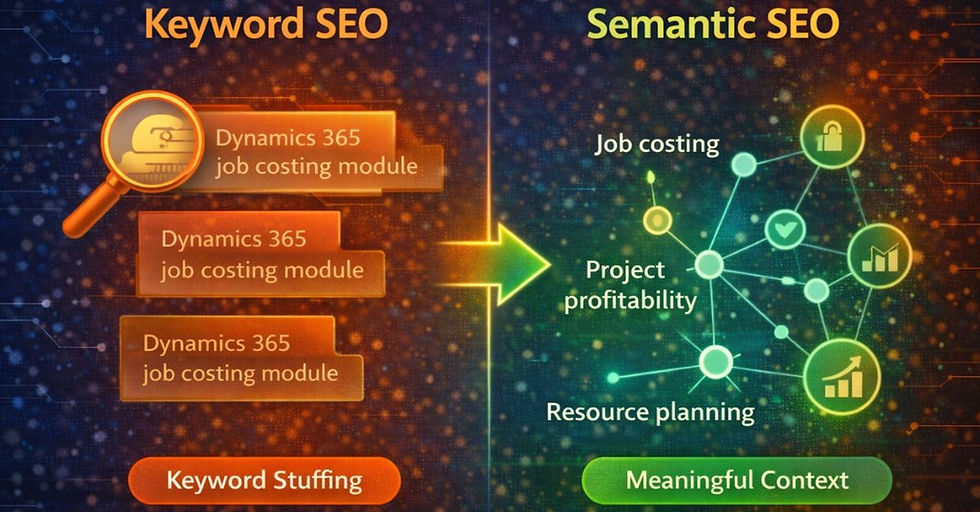
Semantic search is about meaning, not just words.
Search engines and AI models utilize context, intent, and relationships between concepts to deliver the most relevant answer.
Why It Matters for Microsoft Dynamics Partners
Think about a prospect who asks Microsoft Copilot:“How can I manage job costing and resource allocation in Business Central?”
If your page only talks about “Dynamics 365 project accounting add-on,” you might miss the opportunity.
But if your content explains how job costing connects to profitability, resource planning, and cash flow, Copilot is more likely to surface your solution.
In other words, semantic depth wins over keyword repetition.
A Quick Comparison
Old SEO (Keyword-Centric) | New SEO (Semantic & Conversational) |
Focused on exact keyword matches | Focused on intent and meaning |
Pages optimized around single phrases | Pages optimized to answer questions |
Example: “Dynamics 365 manufacturing ERP add-on” | Example: “Which ISV solutions help manufacturers cut production costs in Dynamics 365?” |
Success is measured by page ranking | Success is measured by being chosen in AI answers |
How to Optimize for Semantic Search
Write in Natural Language - Don’t force keywords. Use the same language buyers would use in a meeting or a discovery call.
Answer Questions Directly - Use FAQs, subheadings, and short paragraphs that sound like responses to real queries.
Expand on Context - Demonstrate how your solution addresses related business challenges. AI tools reward content that connects the dots.
Use Schema & Metadata - Structured data enables AI tools to understand the content's subject matter and its relevance to buyer intent.
Up next: We’ll break down real examples of Dynamics buyer queries in AI vs Google so you can see exactly how to shift your content strategy.
Real Examples: AI Queries vs. Google Queries
The fastest way to see the shift from keywords to conversations is by looking at how buyers actually phrase their searches.
Let’s put Google-style queries side by side with the kinds of natural language questions buyers are now asking in AI tools like ChatGPT, Copilot, or Gemini.
Side-by-Side Comparison
Google-Style Query | AI-Powered Conversational Query |
Dynamics 365 project accounting module | “How can Dynamics 365 Business Central help me track project profitability and job costing?” |
Dynamics 365 ISV manufacturing ERP add-on | “What’s the best ISV solution for manufacturers using Business Central to reduce production costs and improve scheduling?” |
Business Central inventory management | “Which Dynamics 365 Business Central solutions make it easier to manage inventory and avoid stockouts?” |
CRM for SMB Dynamics 365 | “What’s the best Dynamics 365 CRM option for a small distribution company that needs pipeline visibility and automated follow-up?” |
Dynamics GP migration tool | “How can I move from Dynamics GP to Business Central without losing historical financial data?” |
What These Examples Show
Google favors keywords. Short phrases, no context.
AI favors conversations. Buyers explain their challenge and expect a direct answer.
Intent is richer. Notice how AI queries include the why (“reduce costs,” “avoid stockouts”) — not just the what.
Opportunity is bigger. If your content is optimized to respond conversationally, you’re more likely to become the trusted answer.
Why This Matters to Microsoft Dynamics Partners
For Microsoft Dynamics partners and ISVs, this shift means that your old SEO playbook won’t suffice anymore.
A blog post titled “Dynamics 365 Manufacturing Add-On” might have ranked in Google.
But in AI search, the content that answers the full business question in plain language is what gets surfaced.
Next up: we’ll break down how to structure your content for conversational queries so AI tools can recognize and surface your expertise.
Structuring Content for Conversational Queries
It's no longer enough to sprinkle in keywords.
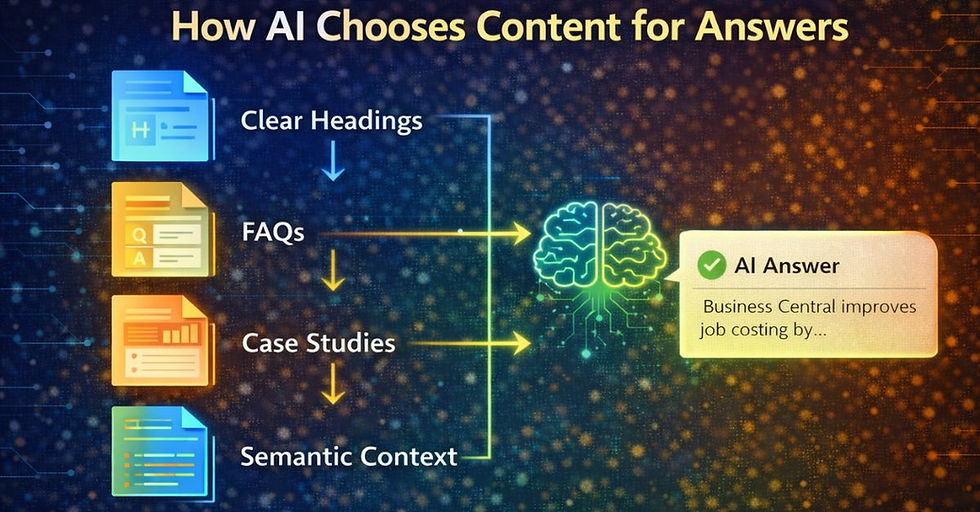
To win visibility in AI-powered search, you need to build your content in a way that aligns with how buyers actually ask questions in conversations.
Here’s how to do it:
1. Write in a Q&A Style
Add FAQs at the bottom of blogs, solution pages, and case studies.
Frame questions the way a buyer would ask them in ChatGPT, Copilot, or Gemini:
“How does Business Central help me reduce month-end close time?”
“What’s the best ISV solution for job costing in Dynamics 365?”
Then answer clearly in 2–3 sentences before expanding further.
2. Use Clear, Scannable Headings
AI tools rely on headings to understand context. Instead of generic headers like “Features”, use semantic headings like:
“How Business Central Improves Cash Flow Management”
“Best ISV Add-Ons for Manufacturers in Dynamics 365”
This helps both human readers and AI recognize what problem you’re solving.
3. Keep Answers Direct
AI search favors clarity over fluff. Don’t bury the answer three paragraphs deep. Lead with the solution, then explain the details.
For example:
Weak: “Managing costs is always difficult. Companies face challenges…”
Strong: “Business Central helps manufacturers manage costs by linking production data to financials in real time. This reduces manual reconciliation and errors.”
4. Include Contextual Signals
AI doesn’t just look at keywords. It interprets intent and relationships between ideas. To help, add:
Case study snippets with measurable results
Industry-specific terms (manufacturing, distribution, professional services)
Clear links between a problem and your solution
5. Optimize for Both Humans and AI
Remember: you are writing for two audiences at once.
Humans want stories, examples, and clarity.
AI wants structure, headings, and direct answers.
If you can balance both, you’ll show up more often in conversations buyers are having with tools like Copilot inside Dynamics 365.
Semantic Search Optimization: Helping AI Recognize Your Authority
Keywords used to be the currency of search. If you hit the correct phrase “Dynamics 365 manufacturing ERP add-on,” you had a shot at ranking.
But AI search doesn’t stop at keywords. It looks for meaning, context, and authority. That’s where semantic search optimization comes in.
Why Semantics Matter
AI models like ChatGPT, Copilot, and Gemini don’t just scan for exact phrases. They try to understand what the buyer means.
A CFO might ask: “How can I improve cash flow forecasting in Dynamics 365 Business Central?”
AI interprets that as related to collections, AR automation, and financial visibility even if the words “cash flow forecasting” don’t appear everywhere in your content.
If your blog or solution page explains that connection clearly, you’re more likely to show up in the answer.
How to Optimize for Semantic Search
Use Related Terms and Synonyms
Don’t repeat the same keyword endlessly. Add natural variations:
“cash flow forecasting”
“AR automation in Business Central”
“Financial visibility for mid-market companies”
Answer the “Why” and the “How”
AI favors content that goes beyond definitions.
Instead of “Business Central has job costing features”, write:
“Business Central improves job costing by linking budgets, resource usage, and project profitability in real time. This gives project managers visibility before costs spiral.”
Add Schema and Metadata
These technical elements help both traditional search engines and AI models classify your content as a solution, product, or review. The clearer your signals, the easier it is for AI to trust and use your content.
Connect Problems to Solutions
Ensure that every section ties a business challenge (e.g., inventory control, delayed reporting, inaccurate forecasts) to a Dynamics feature or ISV solution. This is precisely the kind of relationship AI models are trained to surface.
Why It Matters for Partners and ISVs
When buyers ask conversational questions, they’re looking for insight, not just a product page. Semantic search optimization positions you as the authoritative voice that Copilot, ChatGPT, or Gemini can pull from.
For Dynamics partners, that means:
Being recognized as a credible solution provider.
Showing up in buyer conversations earlier.
Gaining visibility even against larger competitors who may dominate on raw keyword SEO.
Case Examples: How Dynamics Content Shows Up in AI Search
It’s one thing to talk theory.
However, let’s make this real with examples of how Dynamics-related queries are implemented in AI tools compared to Google.
Example 1: Manufacturing ERP Add-ons
Google query: “Dynamics 365 manufacturing ERP add-on”
What you see: a page of AppSource listings, vendor websites, and blogs.
What you have to do: click, skim, compare.
AI query: “What’s the best Dynamics 365 ISV solution for manufacturers to manage production and costs?”
What you see: a conversational answer narrowing options to one or two vendors, with context on why.
What you don’t see: dozens of competitors who never made the cut.
Takeaway for partners: If your content doesn’t explain how your solution solves “production and costs” in plain language, you risk being skipped entirely.
Example 2: Project Profitability in Business Central
Google query: “Dynamics 365 project accounting module”
Results: scattered solution pages, some generic Microsoft documentation, and a few ISV blogs.
Experience: buyers have to guess which solution covers project profitability.
AI query: “How can Dynamics 365 Business Central improve project profitability for a mid-sized services firm?”
Response: AI explains how job costing, resource utilization, and budget tracking improve profitability and may cite specific ISVs with content that matches this framing.
Takeaway for ISVs: The partner who connects “project profitability” directly to their solution in content is the one AI will surface.
Example 3: Cash Flow Forecasting for CFOs
Google query: “Dynamics 365 cash flow forecasting tool”
Results: a mix of Microsoft product pages and finance blogs.
Effort: CFOs have to dig to see if Business Central or an ISV solution really answers their need.
AI query: “Which Dynamics 365 solutions can help a CFO improve cash flow forecasting?”
Response: A synthesized answer that links AR automation, collections, and forecasting tools together, often narrowing down to just one or two credible solutions.
Takeaway for partners: Content that ties the CFO’s pain (cash flow forecasting) directly to Dynamics 365 and your solution is the one AI will pick.
Why These Examples Matter
With traditional search, everyone with a decent SEO strategy could appear on page one. With AI search, only the most clear, contextual, and authoritative content gets surfaced.
For Microsoft Dynamics partners and ISVs, that means:
You’re not competing for rankings; you’re competing for inclusion in the answer.
The winners will be those who frame their content around buyer challenges and conversational questions, not product jargon.
Next up: we’ll explore Action Steps for Partners and Content Teams, so you know how to start optimizing today.
Action Steps for Partners and Content Teams
You don’t need to boil the ocean to start showing up in AI search.
The biggest wins come from small, intentional changes that make your content more answer-friendly.
If you want help implementing these strategies, our Getting Found services help Microsoft Dynamics partners optimize their content for both traditional SEO and AI search visibility.
Here’s how to get moving today:
1. Audit Your Content
Pull your top 5–10 performing pages (blogs, FAQs, solution overviews).
Ask: Would this content make sense if read aloud by Copilot or ChatGPT? If not, it needs work.
2. Reframe for Conversational Search
Rewrite key sections as if you’re answering a prospect’s question directly.
Example: Instead of “Our ISV solution streamlines project accounting”, say “If you’re a services firm struggling with project profitability, here’s how Dynamics 365 and our solution help.”
3. Add FAQs to Pages
Build in 2–4 FAQs per solution page or blog.
Use the actual phrases buyers ask in AI:
“Does Business Central handle job costing?”
“Which ISV solutions improve cash flow forecasting?”
4. Improve Structure and Markup
Use clear H2 and H3 headings that echo buyer queries.
Add schema markup for products, solutions, and reviews so AI can interpret your authority.
5. Create an LLMS.txt File
Even though adoption is early, tools like Wix and SEMrush are already incorporating it.
Adding LLMS.txt now positions you ahead of competitors when AI crawlers start honoring it.
6. Test in Real Tools
Don’t guess open ChatGPT, Copilot, or Gemini and type the queries your buyers would ask.
See what comes back. If you’re not in the answer, go back and refine your content.
The Bottom Line
For Microsoft Dynamics partners and ISVs, AI search isn’t a future problem.
It’s already here. Start small, stay consistent, and your content will be the one buyers see first not your competitors.
Next section: Final Thoughts + Call to Action where we’ll wrap this playbook and give readers a clear next step.
FAQ's
Will AI search replace Google and Bing for B2B buyers?
Not overnight.
Google and Bing still dominate web traffic, and Dynamics buyers rely on them daily.
But AI search is rapidly gaining traction, especially among Gen Z decision-makers.
The reality is that you’ll need to optimize for both models to stay visible in a hybrid future.
What’s the biggest difference between AI search queries and traditional search queries?
Traditional search relies on short, fragmented keywords like “Dynamics 365 project accounting module.”
AI search queries sound like conversations: “How can Dynamics 365 Business Central improve project profitability for a services firm?”
AI interprets context and delivers direct answers instead of links.
Why does semantic search optimization matter for Dynamics partners and ISVs?
Because AI tools don’t just look for keywords, they look for meaning.
Semantic search optimization helps AI models connect your solution to buyer challenges like job costing, cash flow, or manufacturing costs, even if the exact words aren’t used.
Do backlinks and domain authority still matter in the AI search era?
Yes, they still matter for Google and Bing.
But in AI search, authority comes more from how clearly and contextually your content answers buyer questions.
Backlinks and credibility signals still help reinforce trust.
Where should a Microsoft Dynamics partner start with conversational search optimization?
Start small.
Audit your top 5–10 blogs or solution pages and reframe them into a Q&A style. Add FAQs, clear H2/H3 headings, and schema markup.
Then test by asking AI tools like Copilot or ChatGPT the same questions your buyers would.
If you don’t show up, refine and optimize.
Will AI search surface my AppSource listing?
Not directly.
AI search tends to prioritize blogs, FAQs, and solution pages that explain how you solve business problems.
If you want your AppSource listing to appear in answers, you’ll need supporting content that positions your solution in context.
How can I test if my content shows up in AI search?
Easy open ChatGPT, Copilot, Gemini, or Perplexity, and type the exact questions your buyers would ask.
If your business isn’t in the answer, it’s time to optimize.
Final Thoughts
Search isn’t what it used to be.
For years, partners and ISVs have earned visibility with backlinks, page rankings, and keywords.
That playbook still matters, but it’s no longer enough.
AI search has rewritten the rules.
Buyers aren’t scrolling through endless blue links anymore.
They’re asking full questions and expecting one clear, confident answer.
And in that world, you’re either in the answer… or invisible.
Here’s the challenge: old SEO tactics won’t guarantee visibility in AI-driven results.
Here’s the opportunity: with the right strategy, your content can become the trusted answer buyers see first before they ever look at a competitor.
If you’re serious about winning in this new model, don’t wait.
Start here:
Audit your content – Identify your blogs, FAQs, and solution pages that already get traffic.
Reframe for AI – Rewrite sections as direct answers to the questions your buyers actually ask.
Add conversational FAQs – Use Copilot, ChatGPT, and Gemini-style questions as headings.
Layer in semantic optimization – Connect business problems to Dynamics features and your IP, not just keywords.
Test your visibility – Ask AI tools the same questions your prospects are asking and see who shows up.
The partners who move first won’t just keep up; they’ll be the ones AI recommends by default.
If you want a faster path, we can help. Book a free 20-minute AI Search Check-Up with Marketeery.
We’ll show you:
Whether your content is being surfaced in AI answers today
Where competitors are getting the edge
The top fixes that will make the most significant impact, fastest
The future of search is already here.
The only question is: when your buyers ask AI for help, will your brand be in the answer or not even in the conversation?
About Jon Rivers

Jon Rivers is the Co-Founder and COO of Marketeery. His technical background and sales and marketing skills enable him to understand solutions quickly and help drive more effective marketing campaigns. He's an international top-rated speaker. You can find Jon on LinkedIn.