Which AI Tools Are Safe for Business Data? Copilot, ChatGPT, Claude, and Gemini Explained
- Jon Rivers

- Mar 2
- 17 min read

Introduction: Same Tool Name. Very Different Data Rules.
By now, one thing should be clear.
Most of the confusion around AI and business data security does not come from bad tools or bad intent. It comes from assumptions.
Someone hears “we use Copilot” or “we pay for ChatGPT” and assumes the question is settled. Safe or unsafe. Approved or not approved. Move on.
But AI tools do not work like traditional software. The name on the tool is only part of the story. The version, the plan, the login, and the environment matter just as much, and sometimes more.
Two employees can use the same AI tool, ask the same question, and paste the same internal content. The experience feels identical. The data rules behind the scenes are not.
That is why this blog exists.
Recent Pew Research data show that about one in five U.S. workers say they already use AI in their jobs.
The real question is not whether people are using AI.
It is how many of those people are using it inside a secure, business-approved version, versus a consumer tool or personal account that only looks the same on the surface.
This is not a deep technical breakdown or a vendor comparison designed to crown a winner. It is a practical guide to how popular AI tools handle business data in the real world, where teams move fast, and decisions happen in seconds.
We are going to walk through Microsoft Copilot, ChatGPT, Claude, and Gemini. For each one, we will cover which versions are designed for business data, which are not, and where teams most often get tripped up.
Because AI tools are not the problem.
Confusion is.
If you’re looking for the broader leadership framework behind AI data risk, including what “not used for training” really means and why casual use creates exposure, start with Is Your Business Data Safe in AI Tools? A Practical Guide for Leaders.

Table of Contents
Microsoft Copilot: Secure by Design, But Only in the Right Version
Microsoft now uses the Copilot name across a wide range of products. There is Copilot in Microsoft 365, Copilot in Dynamics 365 Business Central, Copilot for Sales, GitHub Copilot, and many others. Each has different capabilities and data-handling rules.
For this discussion, we will focus on Copilot for Microsoft 365 because it is the version most organizations evaluate for everyday business work and is designed to operate within an enterprise security and compliance framework.
That distinction matters.
What follows is not a blanket statement about every Copilot experience Microsoft offers. It is a practical look at how Copilot for Microsoft 365 handles business data, how that differs from the free consumer version, and where teams most often get confused.
Copilot for Microsoft 365: Built for Business Data
When you use Copilot for Microsoft 365 and are signed in with a work account, your data is governed by the same security, compliance, and privacy controls that already protect your Microsoft 365 tenant.
Copilot does not use your organization’s data to train Microsoft’s large language models. It only accesses information that a user already has permission to see through Microsoft Graph.
If a file is restricted in SharePoint, OneDrive, Teams, or Exchange, Copilot cannot bypass that restriction.
Copilot also respects sensitivity labels, encryption, data loss prevention policies, and retention settings configured through Microsoft Purview.
New content generated by Copilot inherits the highest applicable label, and protected content remains protected.
In this setup, Copilot is not introducing a new data pathway. It operates within an environment your organization already manages.
The Free Version of Copilot: A Consumer Tool with Consumer Rules
The free version of Microsoft Copilot is a very different product.
It is designed for individual use, not for handling internal business data.
It does not automatically operate inside your Microsoft 365 tenant, and it does not inherit your organization’s security, compliance, or data governance controls.
When employees paste business information into the free version of Copilot, that data is treated as consumer input. It does not benefit from tenant isolation, Purview labeling, or enterprise data protections.
Depending on user settings and Microsoft’s consumer policies, that data may be logged, reviewed, or used to improve the model.
This is the part that often gets missed.
The Copilot interface looks familiar. The prompts feel the same. But the rules behind the scenes are different.
Why “Signed In” Is Not the Whole Story
Being signed in matters, but what you are signed in to matters more.
Signing in with a personal Microsoft account is not the same as using Copilot for Microsoft 365. One gives you consumer protections.
The other gives you enterprise protections.
This is where confusion shows up in real workflows. Someone uses Copilot safely inside Outlook or Teams, then later opens Copilot in a browser using a personal account because it is already logged in.
The experience feels consistent. The data handling is not.
From the employee’s point of view, nothing changed.
From a governance standpoint, everything did.
What This Means for Teams Using Copilot
Copilot is one of the safer AI options for business data when it is deployed intentionally.
That means:
Using Copilot for Microsoft 365, not the free version
Ensuring employees understand which version is approved
Treating the free consumer version as off-limits for internal context
Auditing permissions so Copilot reflects the right boundaries
Copilot does not create data risk on its own. Confusion about versions does.
And that confusion is exactly what organizations need to address if they want to use Copilot confidently, rather than assuming it is safe by default.
ChatGPT: Version Matters More Than Most People Realize
ChatGPT is often where AI data conversations get the most tangled.
Part of that is popularity. ChatGPT is widely available, easy to access, and deeply embedded in how people experiment with AI. Another part is naming. “ChatGPT” sounds like a single product, but in practice, it represents several distinct experiences with different data rules.
From a business data perspective, that difference matters more than whether you pay for it.
ChatGPT Is Not One Product
When employees say they are using ChatGPT, they could mean any of the following.
They might be using the free consumer version. They might be paying for ChatGPT Plus on a personal account.
They might be using ChatGPT Business or Enterprise at work.
Or they might be interacting with ChatGPT through an API integrated into another tool.
The interface looks similar across all of them. The prompts feel the same. The answers often look identical.
The way data is handled is not.
Free and Plus: Consumer Tools with Consumer Rules
The free version of ChatGPT and the Plus plan are consumer products. They are designed for individual use, not for handling internal business data.
By default, content entered into these versions may be used to improve OpenAI’s models unless the user explicitly opts out. Even when training is disabled, data may be retained for a period for abuse monitoring and system operations.
There are no enterprise admin controls. There is no tenant isolation. There is no organizational governance layered on top.
This is where many teams get tripped up.
Plus is a paid plan, so it feels safer. It is faster, more capable, and more reliable than the free version. But it is still a consumer product. Paying for it does not turn it into an enterprise environment.
For business data, that distinction is critical.
ChatGPT Business and Enterprise: Built for Work Use
ChatGPT Business and ChatGPT Enterprise are designed specifically for organizational use.
By default, these versions do not use customer data to train large language models. Data is handled under enterprise privacy commitments, with stronger controls around retention, access, and administration.
Enterprise plans include features like admin oversight, auditability, and clearer data boundaries. ChatGPT behaves less like a personal assistant and more like a governed business tool.
This is the version organizations have in mind when they say, “We use ChatGPT at work.”
But that assumption only holds if employees are using the business version.
Where Teams Get ChatGPT Wrong
Most ChatGPT data risk shows up quietly.
An employee starts with ChatGPT Plus on a personal account because it is already open.
They paste meeting notes, draft a proposal, or summarize a customer call.
Later, the organization rolls out ChatGPT Enterprise, but habits do not change overnight.
From the employee’s point of view, nothing feels different. The prompt box looks the same. The responses are familiar.
From a data perspective, the rules have changed, but only if the employee switches accounts.
This is why approval alone is not enough. Without clear guidance and reinforcement, teams will continue to use the fastest and most familiar version.
The Bottom Line on ChatGPT
ChatGPT can be safe for business data, but only in its business and enterprise forms.
The free and Plus versions are not designed for an internal business context, even though they are powerful and widely used.
If teams cannot quickly confirm which version they are using, they should assume they are in a consumer environment and avoid pasting internal information.
With ChatGPT, the biggest risk is not the tool itself.
The assumption is that all versions follow the same rules.
They do not.

Claude: Strong Privacy Defaults, but the Plan Still Matters
Claude often enters these conversations with a reputation for being more privacy-forward.
That reputation is not entirely wrong.
But as with every other AI tool, the details matter more than the headline.
Claude is available across consumer and business plans, and while Anthropic has been clear about its privacy intentions, how data is handled still depends on which version a team uses.
Claude Is Split Cleanly Between Consumer and Business Use
Claude is generally accessed in one of two ways.
Some users are on consumer plans, such as Free or Pro. Others are using Claude through Team, Enterprise, or API deployments that are explicitly designed for business use.
The experience across these versions can feel very similar.
The interface is familiar.
The conversational flow is the same.
But the data rules behind them are different.
That distinction is where teams need to pay attention.
Consumer Claude: Privacy-Minded, but Not Business-Safe
Claude’s consumer plans are built for individual use. They are not designed to operate inside an organization’s security boundaries.
Depending on settings and policy updates, consumer usage may allow data to be retained and, in some cases, used for model improvement unless a user opts out. Retention windows and controls are not designed for enterprise governance, and there is no organizational visibility into how the tool is being used.
This is where small teams and startups often get caught off guard.
Claude Pro can feel like a reasonable middle ground. It is paid. It is marketed as more capable. It carries a privacy-first brand reputation.
But it is still a consumer product.
From a business data standpoint, that distinction matters.
Claude Team, Enterprise, and API: Designed for Business Data
Claude’s business plans are structured differently.
Team, Enterprise, and API deployments are designed by default to keep customer data out of training pipelines.
They offer clearer retention controls, stronger administrative oversight, and contractual commitments around how data is handled.
In these environments, Claude behaves like a business tool rather than a personal assistant. Data boundaries are explicit. Usage is governed. Risk is significantly reduced.
This is the version leaders have in mind when they say they are comfortable using Claude for work.
Where Teams Get Claude Wrong
The most common mistake with Claude is assuming that its privacy reputation applies equally across all plans.
It does not.
Teams adopt Claude organically. Someone uses the free version.
Another upgrade to Pro. Business usage slowly creeps in because the tool feels safe and thoughtful.
Without an intentional switch to a business plan, that usage happens in a consumer environment.
From the outside, everything looks fine.
From a governance perspective, the guardrails are missing.
The Bottom Line on Claude
Claude can be a solid option for handling business data, but only when used through Team, Enterprise, or API deployments.
Consumer plans, including Pro, are not designed for internal business use, even if they may feel privacy-focused.
As with every AI tool, safety does not come from the brand or the reputation. It comes from the plan, the configuration, and whether teams know which version they are using.
With Claude, clarity matters more than assumptions.
Gemini: Clear Enterprise Boundaries, Blurry Consumer Use
Gemini is a good example of how enterprise and consumer AI can diverge sharply, even when they share the same name.
Google has been relatively clear about how Gemini handles data in business environments. Where confusion shows up is everywhere else.
Gemini Exists in Two Very Different Worlds
Gemini is available in enterprise contexts, such as Google Workspace and Google Cloud, and in consumer contexts tied to personal Google accounts.
Those environments follow different data rules.
Gemini for Workspace and Gemini for Cloud are designed to operate inside an organization’s existing Google security and compliance framework.
Consumer Gemini, including free and personal subscription versions, is built for individual use.
The interface looks familiar across both.
The underlying data handling is not.
Gemini for Workspace and Cloud: Designed for Business Data
When Gemini is used inside Google Workspace or Google Cloud, business data is governed by Google’s enterprise privacy commitments.
Prompts and responses are not used to train Google’s large language models.
Data stays within the organization’s environment and is protected by the same controls that already apply to Gmail, Drive, Docs, and other Workspace services.
Enterprise-grade encryption, access controls, and compliance certifications apply. Gemini does not bypass existing permissions. If a user cannot access a document directly, Gemini cannot surface it.
In this context, Gemini behaves like a natural extension of Google’s enterprise ecosystem.
Consumer Gemini: Familiar Experience, Different Rules
Consumer Gemini is a different story.
When Gemini is used with a personal Google account, the data handling rules change. User inputs may be retained and, depending on settings and policies, used to improve Google’s models unless the user explicitly opts out.
There is no tenant isolation. There are no organizational admin controls. And there is limited visibility into how data is stored or reviewed.
This is where teams can run into trouble.
Someone might use Gemini safely at work through Workspace, then open Gemini at home or in a personal browser profile and paste similar content without realizing the protections no longer apply.
From the user’s perspective, it feels like the same tool.
From a data governance perspective, it is not.
Where Teams Get Gemini Wrong
The most common mistake with Gemini is assuming that Google’s enterprise reputation applies everywhere.
It does not.
Teams often mix personal and work Google accounts throughout the day. Browser profiles blur together.
Tabs stay open.
The shift from Workspace to consumer Gemini happens quietly.
No warning appears. Nothing feels risky.
But the moment that shift happens, the data boundaries change.
The Bottom Line on Gemini
Gemini can be safe for business data when used within Google Workspace or Google Cloud, with the right configuration.
It is not designed for internal business context when used through consumer or personal Google accounts.
As with every other AI tool, the risk is not the technology itself. It is the assumption that the same rules apply everywhere.
With Gemini, knowing which environment you are in matters just as much as what you are asking it to do.
A Side-by-Side Comparison: Which AI Tools Are Safe for Business Data
By this point, a pattern should be clear.
Most AI data risk does not come from the tool itself.
It comes from using the right tool in the wrong version, or the wrong tool with the right intent.
Looking at each platform individually is helpful.
Seeing them side by side makes the differences harder to ignore.
The table below is not meant to rank tools or recommend one over another.
It is meant to make the data rules visible, so teams can make informed decisions rather than rely on assumptions.
AI Tool | Business-Safe Version | Safe for Business Data? | Used for LLM Training? | Requires Work Account | Admin Controls & Governance | Notes |
Microsoft Copilot | Copilot for Microsoft 365 | Yes | No | Yes | Yes (Purview, DLP, audit logs) | Safe only inside the Microsoft 365 tenant |
Microsoft Copilot (Free) | Consumer Copilot | No | Possibly (depends on settings) | No | No | Not designed for internal business data |
ChatGPT | Business / Enterprise | Yes | No | Yes | Yes (admin, audit, retention) | Requires an explicit business plan |
ChatGPT (Free / Plus) | Consumer versions | No | Yes, by default (opt-out available) | No | No | Paid Plus is still consumer |
Claude | Team / Enterprise / API | Yes | No (unless opt-in) | Yes | Yes (retention, access controls) | Business plans only |
Claude (Free / Pro) | Consumer versions | No | Possibly (opt-out required) | No | No | Privacy reputation does not change plan rules |
Gemini | Workspace / Cloud | Yes | No | Yes | Yes (Workspace admin controls) | Safe inside Google enterprise environment |
Gemini (Consumer) | Personal accounts | No | Yes by default (opt-out required) | No | No | Personal Google accounts lack business protection |
How to Read This Table
A few things are worth calling out.
First, paying for a tool does not automatically make it safe for business data.
Several consumer plans are paid and still lack enterprise protection.
Second, the same brand name can represent both safe and unsafe environments. Copilot, ChatGPT, Claude, and Gemini all fall into that category.
Third, identity and governance matter as much as the model itself.
Tools that operate inside an authenticated business environment with admin controls behave very differently from tools designed for individual use.
This table is not about discouraging AI adoption. It is about making the rules explicit.
Once teams can clearly see the differences, the next question becomes practical.
How do you quickly tell which version you are using before you paste something in?
That is what we will cover next.
How to Check Your AI Version in 30 Seconds (Copilot, ChatGPT, Claude, and Gemini)
At this point, the most useful thing we can do is get very practical.
Most data risk does not come from someone trying to do the wrong thing. It comes from someone moving fast and assuming the version they are using has business protection when it does not.
So here is a simple tool-by-tool check you can do before you paste anything internal.
Microsoft Copilot: Make Sure You Are in the Microsoft 365 Version
Microsoft uses the Copilot name across a wide range of products.
For this blog, we focus on Copilot for Microsoft 365 because it is the version designed to operate within an enterprise security and compliance framework.
The key question is not “Am I using Copilot?” It is “Am I using Copilot inside my work environment?”
Quick checks
If Copilot is running in Microsoft 365 apps like Outlook, Teams, Word, Excel, or PowerPoint, and you are signed in to your work account, you are likely in the Microsoft 365 version.
If you are using Copilot through a general web page or a standalone experience that looks more like a consumer assistant, pause and verify what account you are signed into.
If you need a definitive answer
Copilot for Microsoft 365 requires a specific license. Your IT admin can confirm this in the Microsoft 365 Admin Center or by using Microsoft’s Copilot license diagnostic tools.
If you cannot confirm you are licensed and signed in through your work account, assume you are in a consumer environment and avoid pasting internal business data.
ChatGPT: Check Your Plan Label Before You Paste Anything Internal
ChatGPT makes version checking straightforward. You just have to look.
Quick check
Open ChatGPT
Click your profile icon
Look for your plan label
You may see plan names such as Free, Go, Plus, Pro, Business, or Enterprise.
Free, Go, Plus, and Pro are consumer plans. Even when they are paid, they are not designed for internal business context.
Business and Enterprise are the versions intended for organizational use. They typically include workspace features and admin controls that consumer plans do not.
If you do not see Business or Enterprise, treat it as consumer use and keep internal business data out of prompts.
Claude: Confirm Whether You Are on a Business Plan
Claude also has clear plan tiers, but most users never check.
Quick check
Open Claude
Go to Settings through your profile icon
Find your plan
You may see Free, Pro, Max, Team, or Enterprise.
Free, Pro, and Max are consumer plans. Team and Enterprise are the versions designed for business use.
If you are not on Team or Enterprise, assume consumer rules apply and avoid pasting internal context.
Gemini: Make Sure You Are Not in a Personal Google Account
Gemini is easy to mix up because many people use personal and work Google accounts in the same browser.
Quick check
Open Gemini
Click your profile icon
Confirm which account you are using
If you are signed in with a personal Google account and using Gemini through the consumer interface, you are in a consumer environment.
You may see Gemini or Gemini Advanced.
Gemini for Workspace or Gemini Enterprise is only available when your organization provisions it through Google Workspace or Google Cloud.
If Gemini is not clearly tied to your organization’s workspace environment, assume it is consumer.
The One Rule That Covers Every Tool
If you cannot confidently confirm which version you are using in under 30 seconds, assume you are in a consumer environment and do not paste internal business data.
This is not about memorizing product tiers. It is about building a quick habit that protects the business without slowing work down.
That pause is what keeps AI useful without quietly creating risk.
FAQs
Which AI tools are actually safe for business data?
AI tools are safe for business data only when used in their enterprise or business versions.
In practice, this means:
Microsoft Copilot for Microsoft 365
ChatGPT Business or ChatGPT Enterprise
Claude Team, Claude Enterprise, or API
Gemini for Google Workspace or Google Cloud
These versions are designed to operate inside an organization’s security boundaries. They do not, by default, use customer data to train models, enforce identity-based access, or include administrative controls.
Free and consumer versions of the same tools are not designed for internal business data, even if they look similar or are paid.
What happens to my data if I use the free version of ChatGPT, Claude, or Gemini?
When you use free or consumer versions of AI tools, your data is treated as consumer input, not protected business data.
Depending on the tool and your settings:
Prompts and responses may be retained temporarily
Data may be logged or reviewed for quality or abuse monitoring
Content may be used for model improvement unless you explicitly opt out
Consumer versions do not provide tenant isolation, organizational governance, or enterprise privacy guarantees. Even when opt-out controls exist, they rely on individual users to configure them correctly.
That is why free and consumer AI tools should not be used in an internal business context.
How do I know which AI version I’m using and whether it’s safe?
The fastest way to tell is to check how you’re signed in and what plan you’re on.
Start with three quick checks:
Account type: Are you signed in with a work account or a personal account?
Plan label: Does the tool clearly say Business, Enterprise, Team, or Workspace?
Enterprise signals: Do you see admin controls, organization names, or workspace settings?
If you cannot confirm the version you’re using in under 30 seconds, assume it follows consumer rules and avoid pasting internal business data.
Version clarity matters more than the tool name.
Is paying for an AI tool enough to protect business data?
No. Paying does not automatically mean enterprise is safe.
Many AI tools offer paid consumer plans that are still designed for individual use. Examples include ChatGPT Plus or Claude Pro. These plans may improve performance, but they do not add enterprise data protection.
What protects business data is:
The type of plan, not the price
Whether the tool is deployed inside a business environment
Whether it includes explicit guarantees about data use and training
Only business or enterprise plans are designed for handling internal company information.
What mistakes do employees commonly make with AI and business data?
Most mistakes are not malicious. They happen because people are moving fast.
Common examples include:
Using personal accounts instead of work accounts
Assuming “not used for training” means data is not retained
Copying raw internal documents into consumer AI tools
Believing paid consumer plans are safe for business data
Not realizing the AI version changed between sessions
Employees are trying to be productive. The risk comes from unclear boundaries, not bad intent.
Clear guidance and simple version checks prevent most of these issues.
Closing: Tools Don’t Create Risk. Confusion Does.
If there is one theme that runs through all of this, it is not technology. It is clarity.
Microsoft Copilot, ChatGPT, Claude, and Gemini can all be used responsibly in a business context.
None of them is inherently unsafe.
The risk arises when teams assume the rules are the same everywhere or fail to realize that the rules have changed.
The most common moments of data exposure do not come from bad decisions.
They come from reasonable ones. Someone moves quickly.
The tool looks familiar. The prompt feels harmless.
Nobody pauses to ask which version they are actually using.
That is the gap organizations need to close.
This is not about locking tools down or slowing people down.
It is about making the invisible visible. When teams can verify the version they are using in 30 seconds, most accidental exposure becomes preventable without killing momentum.
AI is only going to become more embedded in everyday work. It will be easier to access, more conversational, and harder to distinguish between consumer and enterprise experiences.
The organizations that navigate this well will not be the ones with the longest policies.
They will be the ones that give people simple rules, clear boundaries, and the confidence to use AI without guessing.
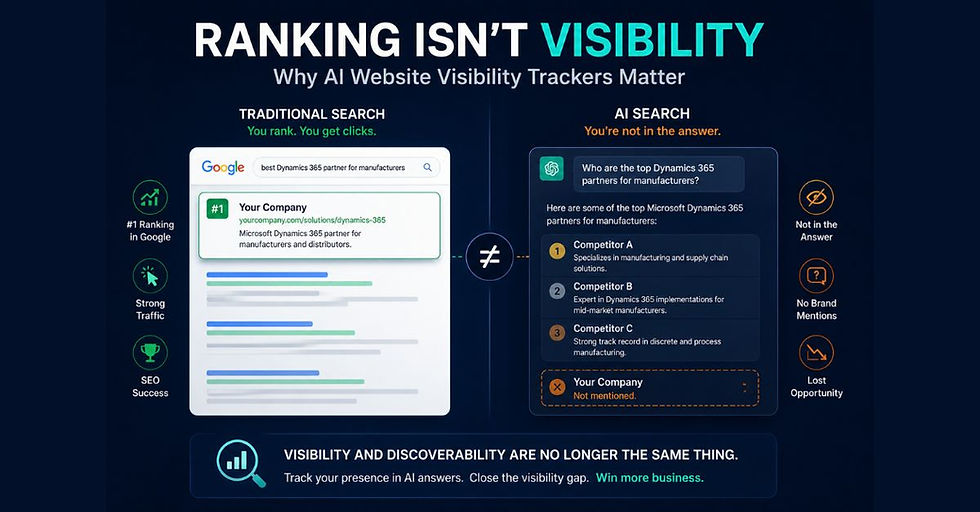
As AI becomes more embedded in how people search and evaluate vendors, clarity matters not just for data protection, but for visibility.
If you’re thinking about how to show up accurately in AI-driven search results, learn more about how we help businesses get found.
Because in the end, AI tools are not the problem.
Using them without clarity is.
About Jon Rivers

Jon Rivers is the Co-Founder and COO of Marketeery. His technical background and sales and marketing skills enable him to understand solutions quickly and help drive more effective marketing campaigns. He's an international top-rated speaker. You can find Jon on LinkedIn.